![[OFFICIAL] Honkai Star Rail Acheron RGB Backlit Mechanical Keyboard](/images/teyvattavernhq.shop/images/product/official-honkai-star-rail-acheron-rgb-backlit-mechanical-keyboard-1.webp)
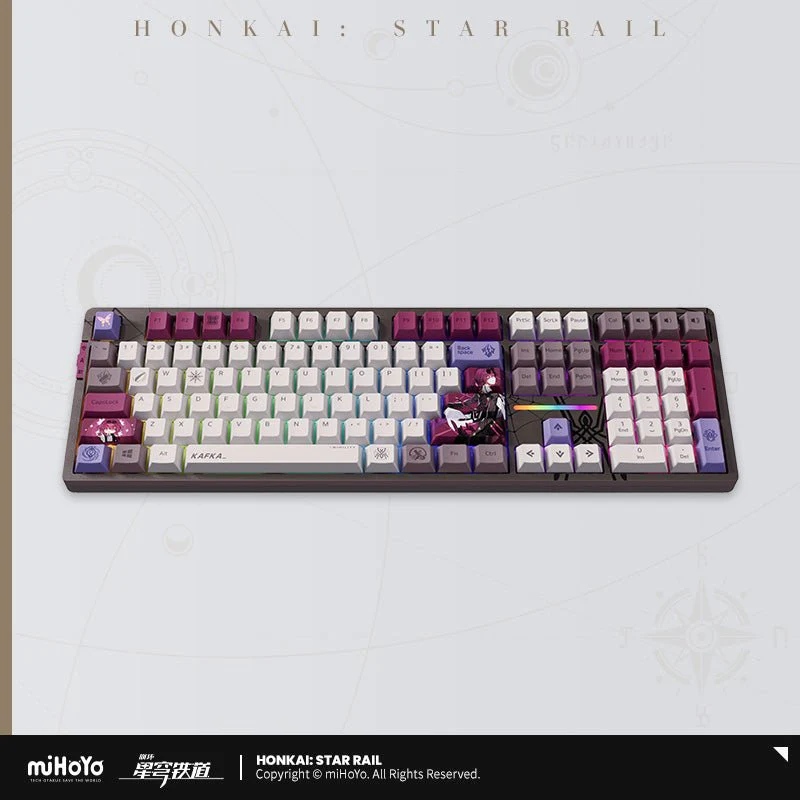
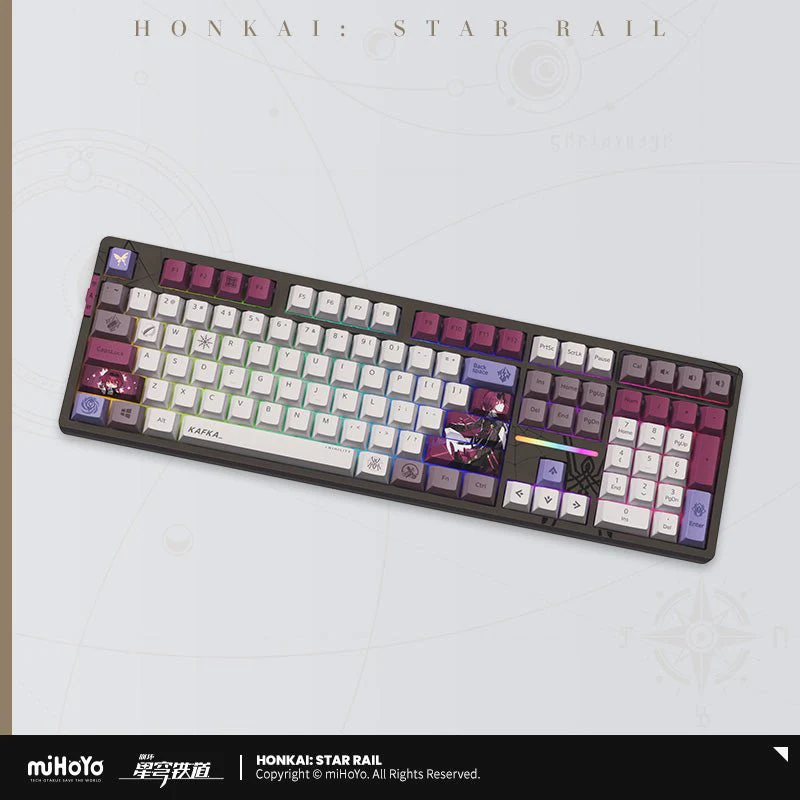
[OFFICIAL] Honkai Star Rail Acheron RGB Backlit Mechanical Keyboard

Item Name: Honkai Star Rail Acheron RGB Backlit Mechanical Keyboard
Specifications:
- 108-Key: 444.7 x 136.6 x 39.7mm
- 87-Key: 364 x 137 x 44mm
Material:
- Keyboard Frame: ABS
- Keycap: PBT
- Transparent Keycap: PC
Keycap Process: 5-Sided Heat Sublimation, Silk Screen Printing.
Feet: 2 Stages
Backlit: 16 Milloin Customizable RGB Colors, 108 Key Lower Light Position,87 Key Upper Light Position
Battery Capacity: 8000 mAh
Keyboard Structure: GASKET
Keyswitch Seat: Kailh
Keyswitch Option: Kailh Ice Cream Switch, Kailh Crystal Pearlescent Purple Switch
Connection: Bluetooth 5.0 / 2.4G wireless / Type-C
System Support: Windows / MacOS / Linux / Android
Contents:
- Keyboard
- USB-A to USB-C data cable
- User Manual (three templates)
- 2.4G Receiver
- Keycap Puller
- 3 switches of the same type as the keyboard
- Dust Cover

Keyboard 87Key / 108 Key Display
87Key Keyboard With Compact Keyboard Layout to Saves More Desktop Space

Themed Keycaps
All keycaps are divided into 4 categories according on height (R1-R4)
When replacing keycaps, they must be matched according to category.
Incorrect replacement may cause damage to the keycaps and switches!

Keyswitch Options

Ice Cream Switch
- Type: Linear
- Operating Force: 45±10gf
- Pre-travel Distance: 1.7±0.5mm
- Total Travel Distance: 4.0±0.3mm
Crystal Pearlescent Purple SwitchSwitch
- Type: Paragraph
- Operating Force: 45gf
- Pre-travel Distance: 1.8±0.3mm
- Total Travel Distance: 3.6±0.3mm
Connection Method

Wireless three-mode connection
Bluetooth 5.0 / Wireless 2.4G / Type-C three connection modes support multiple systems to meet the needs of different scenarios.
QUICK START:
2.4G WIRELESS CONNECTION:
- Take out the receiver from the storage slot on the right side
- Plug the receiver into the USB port of your computer
- Pull the mode switch on the left to 2.4G mode
BLUETOOTH CONNECTION:
- Pull the mode switch on the left to Bluetooth mode
- Long press Fn + number key 1, 2 or 3 to start pairing, the long indicator light flashes quickly during pairing
- Supports pairing with up to 3 devices. Press Fn + number keys 1,2or 3 to switch devices.
WIRED CONNECTION:
- Insert the Typc-C cable into the keyboard port
- Connect the cable to the computer
- Move the mode Switch on the left to the middle
TIPS:
WIN: Unable to use when Win key is locked, Option key in MAC mode
ALT: Command key in MAC mode
Switch between windows and MAC mode:
Fn + A = Switch to Windows mode
Fn + S = Switch to MAC mode
Backlit Mode

16 Million Adjustable RGB Colors
Rich light effects, lower light position design suitable for more keycaps.
Custom lighting effects:
Press Fn + ~ to call up the Custom backlight, which only supports a set of Custom memory lights.
CUSTOM LIGHTING EDITOR:
- Press Fn + ~ to switch to the custom light mode;
- Press Fn + ~ again to start editing the light. At this time, press the key to be defined. The color of the keyboard light changes with each press.
- After editing, press Fn + ~ again to save the edited light.
Battery Capacity

8000mAh Super Long Battery Life
All keys have no rollover, 1000Hz high return rate, paired with a large 8000mAh battery, and support SMART SPEED low-latency technology, bringing an e-sports-level low-latency experience.
Hot-Swappable Base

All-Key Hot-Swappable Base
It supports hot-swappable mechanical shafts, making it easy for users to replace the shafts and adapt to most shafts on the market to create your own exclusive equipment.
FAQ
Q: Why doesn't my Win key work?
A: When the Win key is locked after pressing the Fn+Win key, the Win key cannot be triggered and used. At this time, the Win indicator light on the keyboard is on, and it can be unlocked by pressing Fn+Win again.
Q: Why are my Win key and Alt key reversed and F1-F12 not responding or turning into function keys?
A: After pressing Fn+S, the keyboard will switch to MAC mode. At this time, under the Windows system, the Win key and Alt key will be reversed, and Fn+F1-F12 will become function keys; press Fn+A to switch Return to Windows mode.

Notes:
- Do not use the device in a humid or high temperature environment to avoid damage to the product.
- Do not immerse the product in any liquid to avoid short circuit or damage to electronic components.
- Do not disassemble or modify the keyboard by yourself to avoid damage to the keyboard and cause safety hazards. If the keyboard fails, please contact professional maintenance personnel for repair.
- During use, if you find that the keyboard is abnormally hot, smoking, or has a strange smell, etc., stop using it immediately.
- Please use batteries that meet the keyboard specifications, and avoid using inferior batteries or mixing batteries of different models to cause damage to the keyboard.
- When the keyboard is not used for a long time, please remove the battery to prevent battery leakage from damaging the keyboard.
Original: $247.99
-65%$247.99
$86.80More Images
![[OFFICIAL] Honkai Star Rail Acheron RGB Backlit Mechanical Keyboard - Image 2](/images/teyvattavernhq.shop/images/product/official-honkai-star-rail-acheron-rgb-backlit-mechanical-keyboard-2.webp)
![[OFFICIAL] Honkai Star Rail Acheron RGB Backlit Mechanical Keyboard - Image 3](/images/teyvattavernhq.shop/images/product/official-honkai-star-rail-acheron-rgb-backlit-mechanical-keyboard-3.webp)
![[OFFICIAL] Honkai Star Rail Acheron RGB Backlit Mechanical Keyboard - Image 4](/images/teyvattavernhq.shop/images/product/official-honkai-star-rail-acheron-rgb-backlit-mechanical-keyboard-4.webp)
[OFFICIAL] Honkai Star Rail Acheron RGB Backlit Mechanical Keyboard
Item Name: Honkai Star Rail Acheron RGB Backlit Mechanical Keyboard
Specifications:
- 108-Key: 444.7 x 136.6 x 39.7mm
- 87-Key: 364 x 137 x 44mm
Material:
- Keyboard Frame: ABS
- Keycap: PBT
- Transparent Keycap: PC
Keycap Process: 5-Sided Heat Sublimation, Silk Screen Printing.
Feet: 2 Stages
Backlit: 16 Milloin Customizable RGB Colors, 108 Key Lower Light Position,87 Key Upper Light Position
Battery Capacity: 8000 mAh
Keyboard Structure: GASKET
Keyswitch Seat: Kailh
Keyswitch Option: Kailh Ice Cream Switch, Kailh Crystal Pearlescent Purple Switch
Connection: Bluetooth 5.0 / 2.4G wireless / Type-C
System Support: Windows / MacOS / Linux / Android
Contents:
- Keyboard
- USB-A to USB-C data cable
- User Manual (three templates)
- 2.4G Receiver
- Keycap Puller
- 3 switches of the same type as the keyboard
- Dust Cover
Keyboard 87Key / 108 Key Display
87Key Keyboard With Compact Keyboard Layout to Saves More Desktop Space
Themed Keycaps
All keycaps are divided into 4 categories according on height (R1-R4)
When replacing keycaps, they must be matched according to category.
Incorrect replacement may cause damage to the keycaps and switches!
Keyswitch Options
Ice Cream Switch
- Type: Linear
- Operating Force: 45±10gf
- Pre-travel Distance: 1.7±0.5mm
- Total Travel Distance: 4.0±0.3mm
Crystal Pearlescent Purple SwitchSwitch
- Type: Paragraph
- Operating Force: 45gf
- Pre-travel Distance: 1.8±0.3mm
- Total Travel Distance: 3.6±0.3mm
Connection Method
Wireless three-mode connection
Bluetooth 5.0 / Wireless 2.4G / Type-C three connection modes support multiple systems to meet the needs of different scenarios.
QUICK START:
2.4G WIRELESS CONNECTION:
- Take out the receiver from the storage slot on the right side
- Plug the receiver into the USB port of your computer
- Pull the mode switch on the left to 2.4G mode
BLUETOOTH CONNECTION:
- Pull the mode switch on the left to Bluetooth mode
- Long press Fn + number key 1, 2 or 3 to start pairing, the long indicator light flashes quickly during pairing
- Supports pairing with up to 3 devices. Press Fn + number keys 1,2or 3 to switch devices.
WIRED CONNECTION:
- Insert the Typc-C cable into the keyboard port
- Connect the cable to the computer
- Move the mode Switch on the left to the middle
TIPS:
WIN: Unable to use when Win key is locked, Option key in MAC mode
ALT: Command key in MAC mode
Switch between windows and MAC mode:
Fn + A = Switch to Windows mode
Fn + S = Switch to MAC mode
Backlit Mode
16 Million Adjustable RGB Colors
Rich light effects, lower light position design suitable for more keycaps.
Custom lighting effects:
Press Fn + ~ to call up the Custom backlight, which only supports a set of Custom memory lights.
CUSTOM LIGHTING EDITOR:
- Press Fn + ~ to switch to the custom light mode;
- Press Fn + ~ again to start editing the light. At this time, press the key to be defined. The color of the keyboard light changes with each press.
- After editing, press Fn + ~ again to save the edited light.
Battery Capacity
8000mAh Super Long Battery Life
All keys have no rollover, 1000Hz high return rate, paired with a large 8000mAh battery, and support SMART SPEED low-latency technology, bringing an e-sports-level low-latency experience.
Hot-Swappable Base
All-Key Hot-Swappable Base
It supports hot-swappable mechanical shafts, making it easy for users to replace the shafts and adapt to most shafts on the market to create your own exclusive equipment.
FAQ
Q: Why doesn't my Win key work?
A: When the Win key is locked after pressing the Fn+Win key, the Win key cannot be triggered and used. At this time, the Win indicator light on the keyboard is on, and it can be unlocked by pressing Fn+Win again.
Q: Why are my Win key and Alt key reversed and F1-F12 not responding or turning into function keys?
A: After pressing Fn+S, the keyboard will switch to MAC mode. At this time, under the Windows system, the Win key and Alt key will be reversed, and Fn+F1-F12 will become function keys; press Fn+A to switch Return to Windows mode.
Notes:
- Do not use the device in a humid or high temperature environment to avoid damage to the product.
- Do not immerse the product in any liquid to avoid short circuit or damage to electronic components.
- Do not disassemble or modify the keyboard by yourself to avoid damage to the keyboard and cause safety hazards. If the keyboard fails, please contact professional maintenance personnel for repair.
- During use, if you find that the keyboard is abnormally hot, smoking, or has a strange smell, etc., stop using it immediately.
- Please use batteries that meet the keyboard specifications, and avoid using inferior batteries or mixing batteries of different models to cause damage to the keyboard.
- When the keyboard is not used for a long time, please remove the battery to prevent battery leakage from damaging the keyboard.
Product Information
Product Information
Shipping & Returns
Shipping & Returns
Description
Item Name: Honkai Star Rail Acheron RGB Backlit Mechanical Keyboard
Specifications:
- 108-Key: 444.7 x 136.6 x 39.7mm
- 87-Key: 364 x 137 x 44mm
Material:
- Keyboard Frame: ABS
- Keycap: PBT
- Transparent Keycap: PC
Keycap Process: 5-Sided Heat Sublimation, Silk Screen Printing.
Feet: 2 Stages
Backlit: 16 Milloin Customizable RGB Colors, 108 Key Lower Light Position,87 Key Upper Light Position
Battery Capacity: 8000 mAh
Keyboard Structure: GASKET
Keyswitch Seat: Kailh
Keyswitch Option: Kailh Ice Cream Switch, Kailh Crystal Pearlescent Purple Switch
Connection: Bluetooth 5.0 / 2.4G wireless / Type-C
System Support: Windows / MacOS / Linux / Android
Contents:
- Keyboard
- USB-A to USB-C data cable
- User Manual (three templates)
- 2.4G Receiver
- Keycap Puller
- 3 switches of the same type as the keyboard
- Dust Cover
Keyboard 87Key / 108 Key Display
87Key Keyboard With Compact Keyboard Layout to Saves More Desktop Space
Themed Keycaps
All keycaps are divided into 4 categories according on height (R1-R4)
When replacing keycaps, they must be matched according to category.
Incorrect replacement may cause damage to the keycaps and switches!
Keyswitch Options
Ice Cream Switch
- Type: Linear
- Operating Force: 45±10gf
- Pre-travel Distance: 1.7±0.5mm
- Total Travel Distance: 4.0±0.3mm
Crystal Pearlescent Purple SwitchSwitch
- Type: Paragraph
- Operating Force: 45gf
- Pre-travel Distance: 1.8±0.3mm
- Total Travel Distance: 3.6±0.3mm
Connection Method
Wireless three-mode connection
Bluetooth 5.0 / Wireless 2.4G / Type-C three connection modes support multiple systems to meet the needs of different scenarios.
QUICK START:
2.4G WIRELESS CONNECTION:
- Take out the receiver from the storage slot on the right side
- Plug the receiver into the USB port of your computer
- Pull the mode switch on the left to 2.4G mode
BLUETOOTH CONNECTION:
- Pull the mode switch on the left to Bluetooth mode
- Long press Fn + number key 1, 2 or 3 to start pairing, the long indicator light flashes quickly during pairing
- Supports pairing with up to 3 devices. Press Fn + number keys 1,2or 3 to switch devices.
WIRED CONNECTION:
- Insert the Typc-C cable into the keyboard port
- Connect the cable to the computer
- Move the mode Switch on the left to the middle
TIPS:
WIN: Unable to use when Win key is locked, Option key in MAC mode
ALT: Command key in MAC mode
Switch between windows and MAC mode:
Fn + A = Switch to Windows mode
Fn + S = Switch to MAC mode
Backlit Mode
16 Million Adjustable RGB Colors
Rich light effects, lower light position design suitable for more keycaps.
Custom lighting effects:
Press Fn + ~ to call up the Custom backlight, which only supports a set of Custom memory lights.
CUSTOM LIGHTING EDITOR:
- Press Fn + ~ to switch to the custom light mode;
- Press Fn + ~ again to start editing the light. At this time, press the key to be defined. The color of the keyboard light changes with each press.
- After editing, press Fn + ~ again to save the edited light.
Battery Capacity
8000mAh Super Long Battery Life
All keys have no rollover, 1000Hz high return rate, paired with a large 8000mAh battery, and support SMART SPEED low-latency technology, bringing an e-sports-level low-latency experience.
Hot-Swappable Base
All-Key Hot-Swappable Base
It supports hot-swappable mechanical shafts, making it easy for users to replace the shafts and adapt to most shafts on the market to create your own exclusive equipment.
FAQ
Q: Why doesn't my Win key work?
A: When the Win key is locked after pressing the Fn+Win key, the Win key cannot be triggered and used. At this time, the Win indicator light on the keyboard is on, and it can be unlocked by pressing Fn+Win again.
Q: Why are my Win key and Alt key reversed and F1-F12 not responding or turning into function keys?
A: After pressing Fn+S, the keyboard will switch to MAC mode. At this time, under the Windows system, the Win key and Alt key will be reversed, and Fn+F1-F12 will become function keys; press Fn+A to switch Return to Windows mode.
Notes:
- Do not use the device in a humid or high temperature environment to avoid damage to the product.
- Do not immerse the product in any liquid to avoid short circuit or damage to electronic components.
- Do not disassemble or modify the keyboard by yourself to avoid damage to the keyboard and cause safety hazards. If the keyboard fails, please contact professional maintenance personnel for repair.
- During use, if you find that the keyboard is abnormally hot, smoking, or has a strange smell, etc., stop using it immediately.
- Please use batteries that meet the keyboard specifications, and avoid using inferior batteries or mixing batteries of different models to cause damage to the keyboard.
- When the keyboard is not used for a long time, please remove the battery to prevent battery leakage from damaging the keyboard.